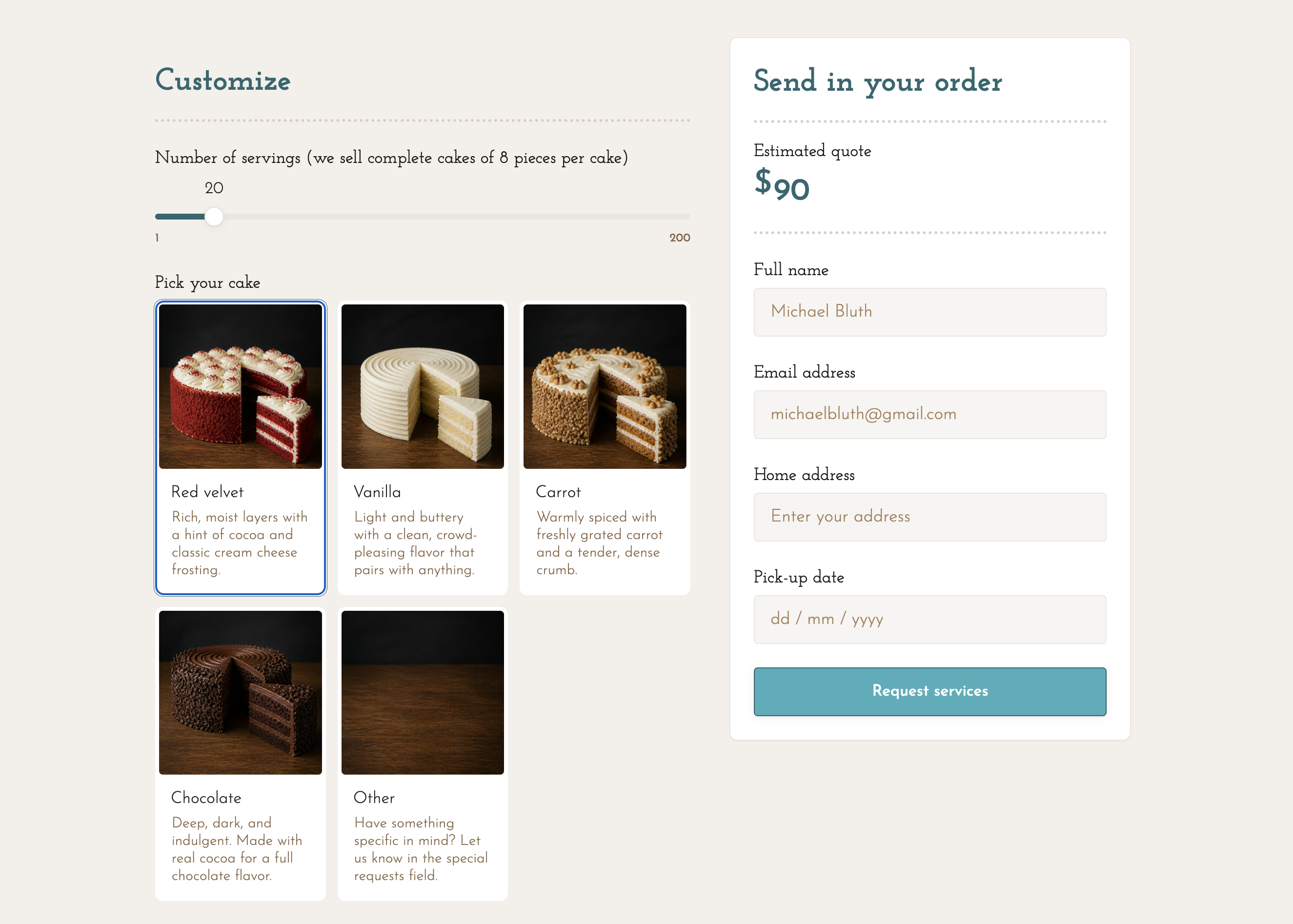
A single-page cake configurator that lets customers build their own order and see a live price before submitting. Every selection updates the estimated quote in real time, reducing back-and-forth and delivering complete, ready-to-action order requests.
The template includes:
- Serving count slider ranging from 1 to 200, with configurable portion and pricing logic (e.g. sold in complete cakes of 8 pieces)
- Cake type selector with five visual cards each displaying a photo and flavour description, plus an Other option prompting for special requests
- Shape selector with radio button options for Square, Circle, and Rectangle
- Filling selector with radio button options including Chocolate, Vanilla, Caramel, Cream cheese, and Buttercream
- Icing selector with radio button options including Buttercream, Cream cheese, Vanilla, Chocolate, and Fondant
- Extras grid with per-serving priced add-ons displayed as selectable tiles
- Special requests text field for any custom notes
- Design file upload accepting images and documents for reference sketches or inspiration photos
- Live quote panel showing the estimated total updating as selections change, alongside a contact form collecting full name, email, home address, and pick-up date
- Request services CTA submitting the full configuration and contact details together
Follow these steps to make the template your own:
- Configure the serving slider Set the minimum, maximum, and default serving count, and update the helper text to reflect your portion or cake size policy
- Update cake type cards Replace the card images, flavour names, and descriptions to match your actual menu
- Set shape options Add, remove, or rename the shape options to reflect what you offer
- Update filling and icing options Edit the radio button labels for each to match your available options
- Configure extras and per-serving prices Update the extras grid labels and assign the correct per-serving price to each
- Update pricing logic Configure how serving count, cake type, shape, filling, icing, and extras combine to calculate the estimated quote
- Update the file upload settings Adjust accepted file types and size limits to match your requirements
- Customise the contact form fields Add or remove fields to match the information you need before confirming an order
- Update the CTA label Change the button text to match your preferred call to action
- Connect form submissions Link the submit action to your email, CRM, or order management tool
- Match your branding Update fonts, colours, and any logo or header imagery to reflect your bakery brand
- Test all combinations Verify the estimated quote calculates correctly across flavours, extras, and serving counts before going live