TemplatesCoffee Event Configurator

Let planners see what their coffee event will cost

Coffee Event Configurator

Preview
Contact formDistance pricingEmail sendingQuote breakdown

Coffee Catering Quote Builder with Live Cup Pricing and Staffing Estimates

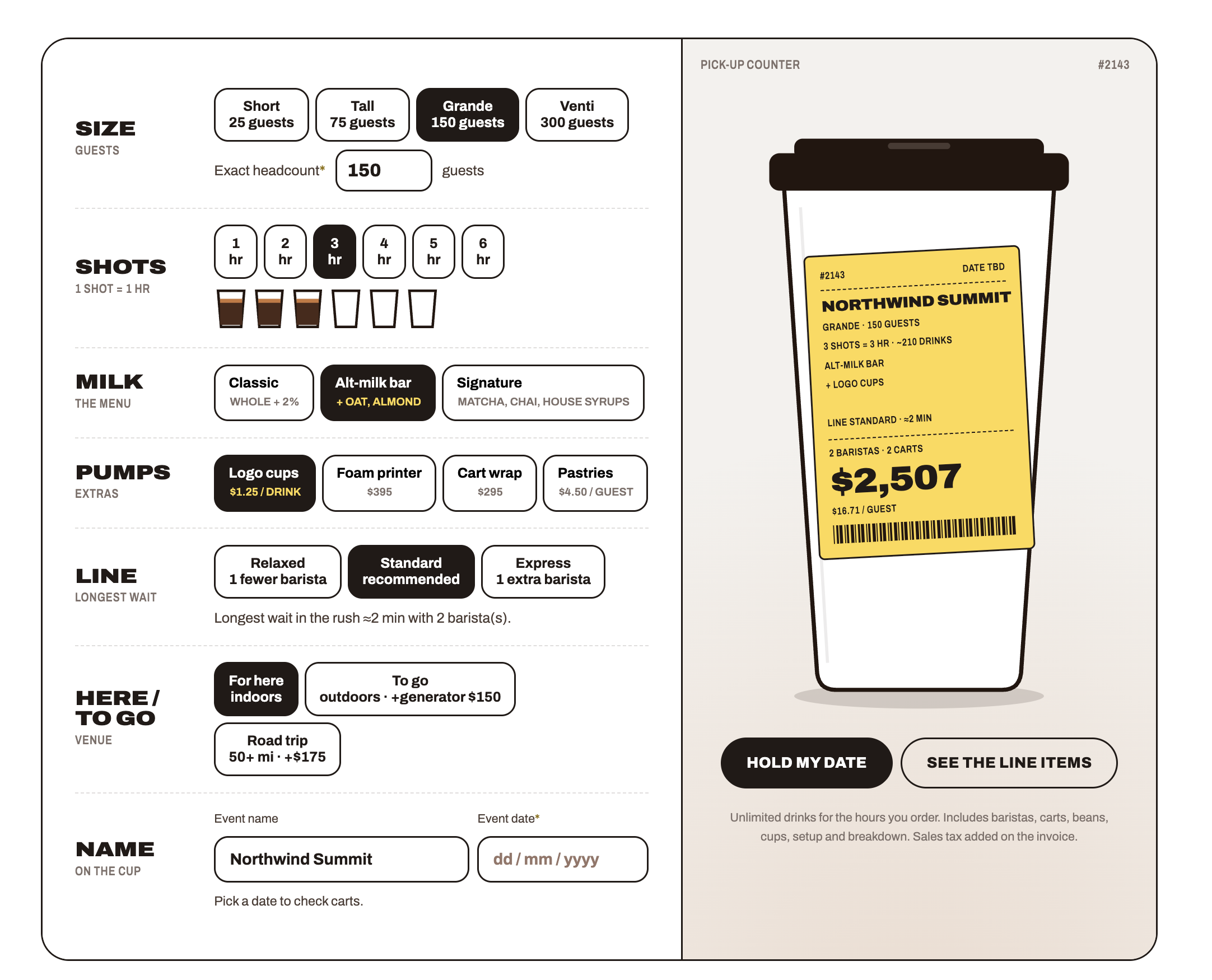
  • The cup-label preview updates with the event name, service plan, estimated price, and cost per guest.
  • The itemized estimate shows how setup, staffing, drinks, and extras shape the total.
  • Guest count and staffing choices produce an estimated drink volume, cart count, and peak wait.

About this template

Mobile coffee businesses price each event around headcount, hours, menu, venue, and staffing. This coffee catering quote builder lets planners compare those choices and see a sample service plan and price before requesting a date.

  • Four cup-size starting points plus an exact headcount field
  • One to six service hours, three menu tiers, and three staffing speeds
  • Optional logo cups, foam printing, cart branding, and pastries
  • Indoor, outdoor, and travel choices that shape the service plan
  • A live cup-label preview with the event name, estimated drinks, carts, staffing, total, and price per guest
  • An expandable breakdown for setup, staffing, drinks, and extras
  • A date request form with name and email, sample availability data, a request record, and a configurable email action

Planners can see how each choice affects service and cost before sending a date request. The request record stores their selections for your team. You can adjust rates and rules without waiting on a developer. The itemized estimate helps explain what drives the total.

Order Up branding, artwork, menu, rates, availability, and capacity assumptions are examples. Date availability reads from the included Bookings table; it is not connected to a live calendar and does not reserve capacity. The email action uses hello@orderup.example, which must be replaced and tested. The confirmation state currently follows submission rather than the result of the request actions, so correct this behavior before launch.

Instructions

  1. Pair it with the landing page Use this tool with the Coffee Catering Cup Quote Builder landing-page template for the matching café-inspired design. That page already includes a quote builder, so use one configurator instance to avoid duplicating the tool.
  2. Replace the sample brand Update the Order Up name, cup artwork, colors, and contact details.
  3. Set your service options Review the headcount presets, exact-headcount limits, service hours, menu tiers, staffing speeds, venue choices, and extras.
  4. Set your rates and assumptions Update the Rates table and formulas for setup, staffing, drink volume, cart capacity, venue, travel, minimum spend, and add-ons. Check totals against your own pricing.
  5. Configure date availability Replace the sample rows in the Bookings table. The template reads this table; it does not connect to a live calendar or reserve a date automatically.
  6. Configure the date request Review the name and email fields, Holds table mapping, and email action. Replace hello@orderup.example and verify email delivery before launch.
  7. Correct the confirmation behavior The current success state follows form submission rather than action success. Update it so a failed record or email action cannot appear to confirm a hold, and state clearly how your team accepts a request.
  8. Test the complete tool Check preset and custom headcounts, every service duration, each menu tier, staffing speed, venue, add-on, date restriction, price breakdown, form validation, and desktop and mobile layouts.

Confirm