















What you'll learn
- Key Takeaways: Convert_ vs. Paperform
- Comparison Table for Convert_ and Paperform
- Feature
- Convert_
- Paperform
Are you a small business choosing a form builder? The challenge is often finding a tool that looks good on the surface but can also handle real business logic as you grow.
Convert_ is better if you need forms with complex calculations and automation, while Paperform is better for design-focused forms.
This comparison, updated for 2026, breaks down where each platform excels, where the limitations appear, and which option makes sense if you need more versatility and long-term scalability.
Key Takeaways: Convert_ vs. Paperform
-
Convert_ is better suited to complex calculations and automation, making it a stronger option for businesses replacing manual quoting or pricing workflows.
-
Convert_ scales more easily for teams, with unlimited users on all plans, while Paperform limits users based on subscription tier.
-
Paperform is best for design-first forms, offering numerous templates and an intuitive interface for fast setup.
-
Businesses that rely on logic-driven tools can get significant time savings with Convert_.
-
Paperform is good for simple workflows, while Convert_ is best for advanced automation.
Comparison Table for Convert_ and Paperform
Feature | Convert_ | Paperform |
Pricing (Annual Plans) | Free until you are seeing results (100 visits). Cheaper plans. | Free for 2 weeks. Plans cost more but have higher visit limits. |
User Interface | Simple and intuitive. No-nonsense, easy to use. | Beautiful, intuitive, and supportive. Hundreds of templates. |
Power and Functionality | Powerful hidden “engines” that allow advanced functionality and calculation power. | Good functionality with built-in workflows. |
Teams | Unlimited users on every payment plan, offering savings for teams with more than one user. | 1 user per plan until the Agency plan with 5 users. User access levels available. |
Integration | Excellent integration capabilities using Zapier. | Excellent integration features using Zapier. |
Concierge Service | Paid, done-for-you form, calculator, and integration service. | Not available. |
What Is Convert_?
Convert_ is a no-code form and calculator builder focused on automation and designed to support marketing, sales, and operational workflows.
It allows businesses to create:
-
Price quote and cost estimation tools
-
Lead capture and funnel automation tools
Convert_ combines a drag-and-drop builder with FormulaScript and conditional logic. This lets you set up advanced calculations without writing code. It’s often used by small businesses that need more than static forms and want their tools to actively drive conversions and automate decision-making.
Home Cleaning Quote Calculator
What Is Paperform?
Paperform is an online form builder designed to help users quickly create visually appealing forms.
It is commonly used for:
-
Surveys and questionnaires
-
Registration and booking forms
-
Order forms and simple workflows
Paperform offers a large template library and a user-friendly interface that makes it easy to get started. Conditional logic is supported, and the platform includes built-in payment integrations and basic automation features.
Paperform is generally well-suited to small businesses that prioritize design, simplicity, and speed over advanced calculation logic.
Pricing and Entry Point Comparison
Getting Started
Convert_ offers a free forever plan, with up to 100 monthly visitors to your forms. This allows businesses to explore the platform, build real tools, and validate workflows before committing to a paid plan.
Paperform offers a 14-day free trial, which works well for users who already know what they want to build and can implement it quickly.
The difference is primarily time flexibility. Convert_ allows extended experimentation, while Paperform emphasizes fast onboarding.
Paid Plans and Scaling
At lower pricing tiers, Convert_ offers a lower entry cost, while Paperform includes more form views at comparable price points.
As needs become more complex, Convert_’s higher-tier plans typically provide stronger value for businesses that need calculations, automation, and data-driven workflows.
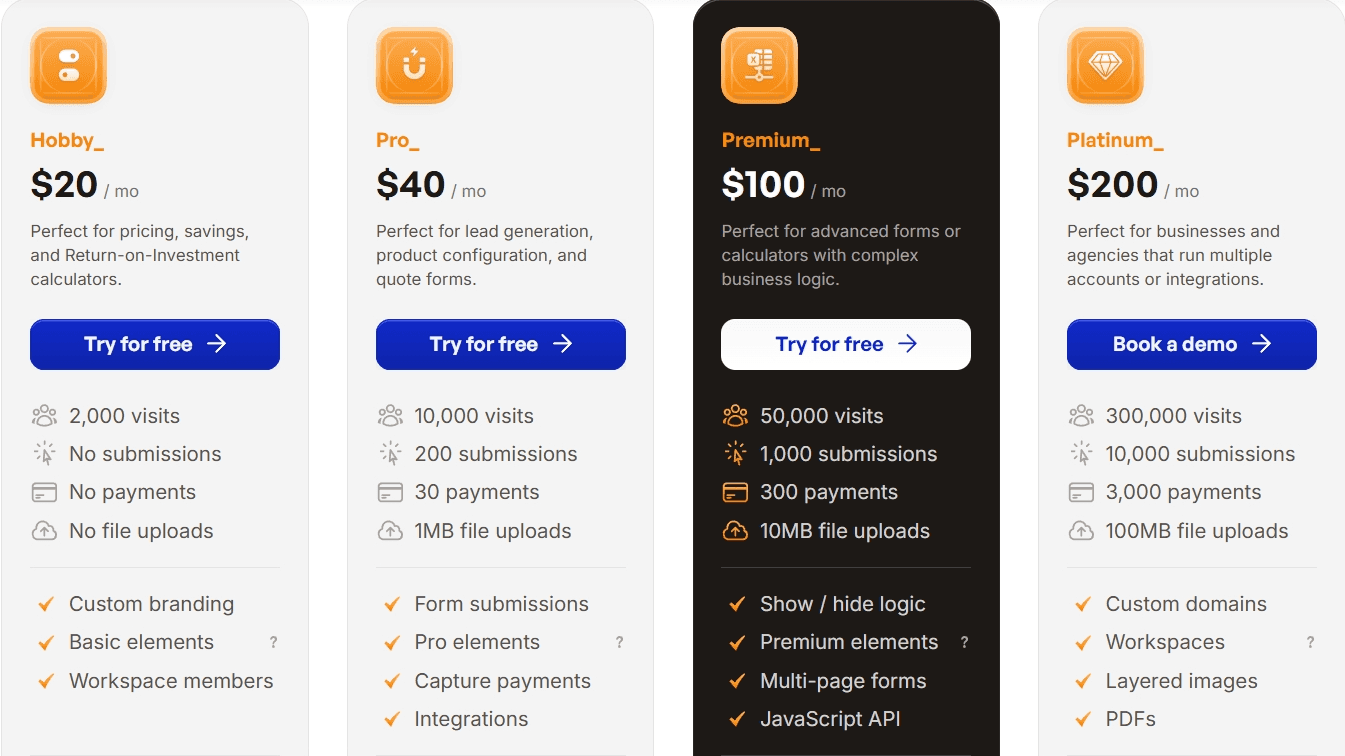
Paperform’s higher-end plans focus more on design features, templates, and agency use cases. Their business plan costs less than Convert_’s premium plan, but their enterprise plan has custom pricing and you need to contact sales for a quote.
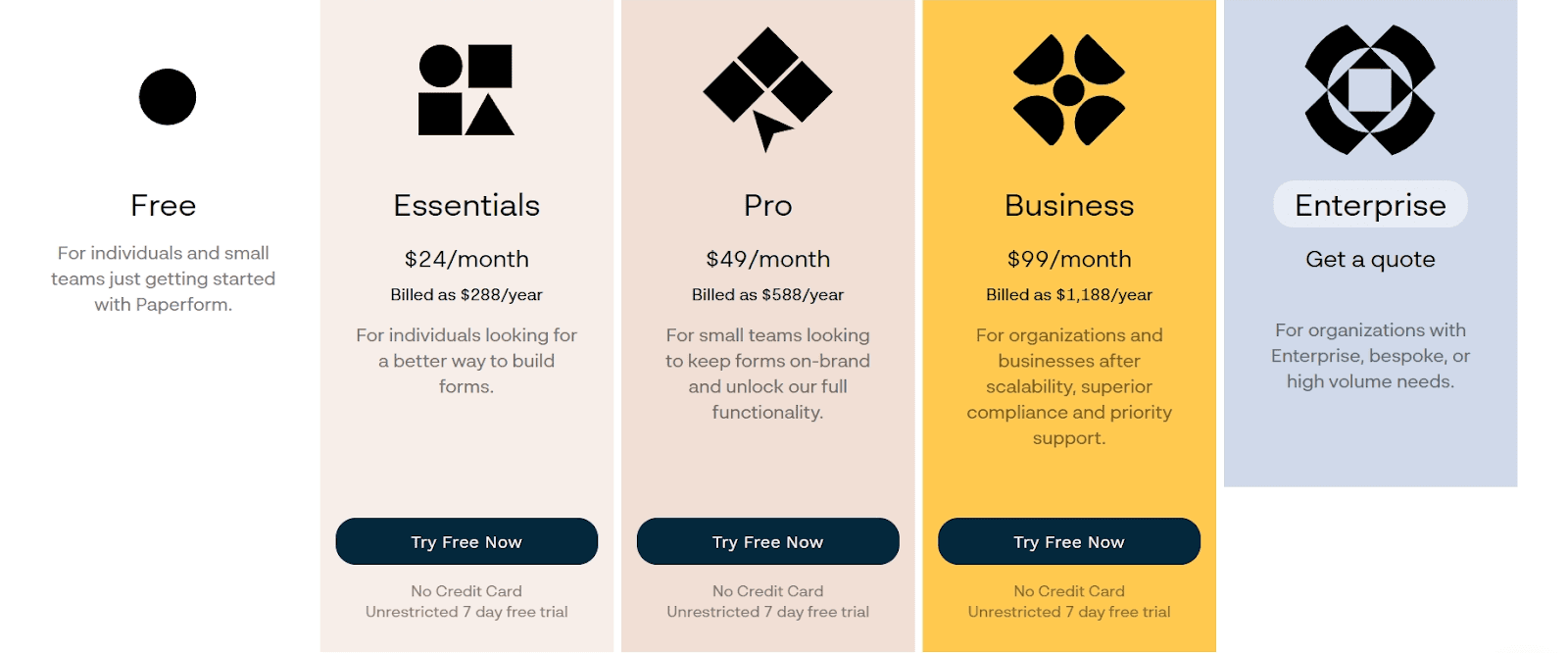
For businesses that expect to grow or expand their use of logic-driven forms, this difference becomes more noticeable over time. Convert_ offers the best option in that case.
User Experience
Convert_
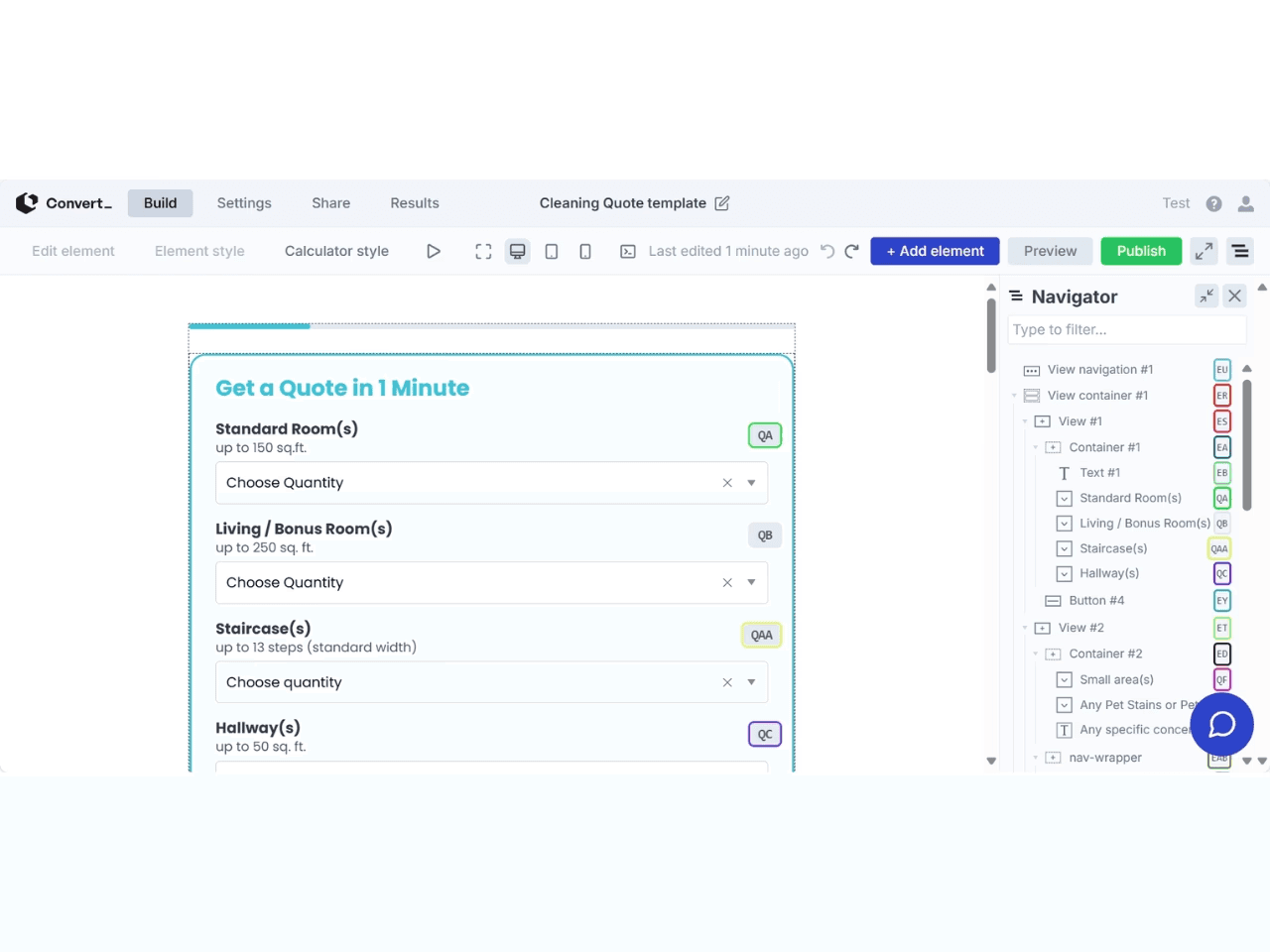
Convert_’s interface is more utilitarian than Paperform’s. The drag-and-drop builder is straightforward, prioritizing practicality over aesthetics.
While there are fewer templates than Paperform, users gain more control over logic, calculations, and automation.
For businesses building advanced tools, this tradeoff favors long-term flexibility over visual polish. Convert_ is your best bet for your needs in this instance.
Paperform
Paperform’s interface is visually polished and intuitive. The platform includes hundreds of templates, inline help, and a guided setup that make it approachable for first-time users.
For design-led forms and standard workflows, the experience feels smooth and supportive.
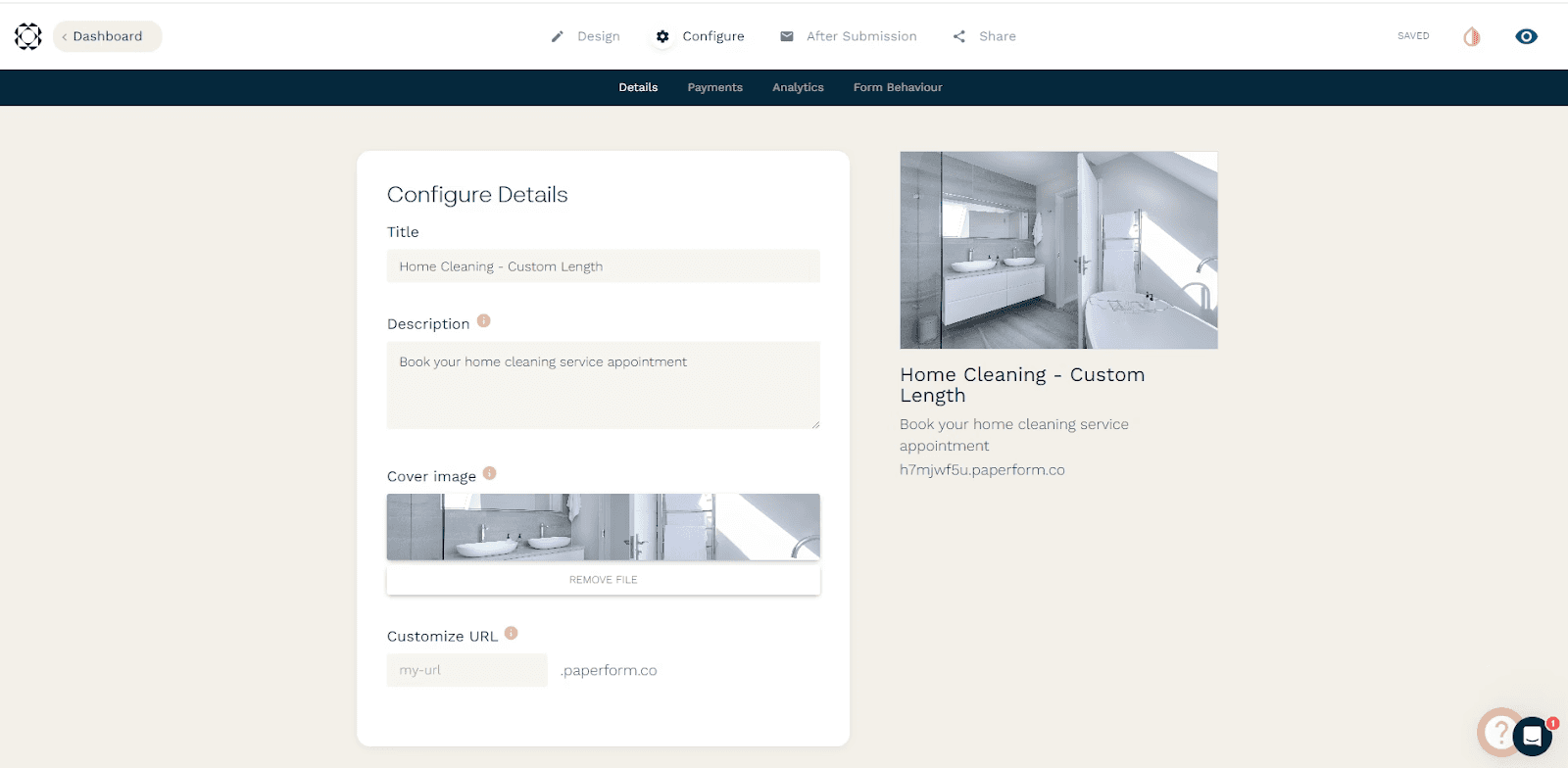
Styling and Branding
Convert_ includes styling controls and CSS support across all plans. In addition, it offers builder-level styling panels and a feature called “quick styles,” allowing businesses to maintain brand consistency across multiple tools without external customization work.
Paperform supports custom styling, but full control over CSS and deep visual integration is limited to its highest-tier plans.
Calculation Power and Automation
Convert_
Convert_’s core strength is its calculation engine.
Using FormulaScript combined with conditional logic, businesses can:
-
Process large datasets
-
Build multi-step logic flows
-
Create dynamic pricing and quoting tools
-
Automate decisions across forms and calculators
There is a learning curve for more advanced use cases, but once familiar, you can build and modify complex tools quickly without relying on developers.
This makes Convert_ particularly suitable for businesses that want their forms to actively replace manual processes.
Screen printing price quote calculator
Paperform
Paperform is functional for standard use cases and includes workflow features supported by clear documentation.
However, when calculations become more complex or logic needs to scale across multiple variables and datasets, Paperform’s capabilities are more limited compared to Convert_.
Team Access and Collaboration
Convert_ allows unlimited users across all plans, including the free tier, using a workspace model. This makes it easier to involve team members, contractors, or assistants without increasing subscription costs.
Paperform limits user access by plan tier and uses role-based permissions (such as Admin, User, and Viewer). This structure can be helpful for access control, but costs increase as additional users are added.
Integrations
Both platforms offer strong integration options.
Paperform integrates with popular tools such as Google Sheets and email platforms, and can be extended via third-party automation tools.
Convert_ integrates with major CRMs, website builders, and payment platforms, and supports automation across a wide range of external systems. This lets you embed calculators and forms directly into existing workflows.
Concierge and Setup Services
Convert_ offers a done-for-you concierge service.
Starting at $250, Convert_ specialists can create your calculators and forms for you. Higher-tier services include integration setup, helping you launch advanced workflows without internal technical effort.
Paperform does not offer a comparable done-for-you service, but provides live chat support and extensive documentation to assist with self-setup.
How Do Convert_Forms Help Companies?
Goodhart Coffee used Convert_ to replace a manual quoting and booking process with an automated calculator form.
They embedded the booking form into their website. Now, their customers can input their requirements and receive instant feedback on availability and pricing.
With the embedded form, Goodhart Coffee doubled bookings and saved 40 hours per week on quoting. Our calculation-driven forms can remove operational friction while increasing conversions.
Final Verdict
Convert_ and Paperform both solve real problems, but they are built for different priorities.
Choose Convert_ if:
-
You need complex calculations and automation
-
You want flexibility without developer dependency
-
You expect your forms to scale with your business processes
-
You want the option for a done-for-you setup service
Choose Paperform if:
-
You value design-first forms
-
You want a fast setup with minimal configuration
-
Your workflows are relatively straightforward
If you need greater versatility and power from your forms in 2026, Convert_ is a strong Paperform alternative.
Screen Printing Quote Calculator








Use cases
