








Convert_ vs. Outgrow: Best Calculator Builder for Marketers





Shane Curry

Shane Curry

Marketing calculators will change how you engage audiences, generate and qualify leads, and drive conversions.
Content like interactive calculators increases engagement by over 50% and boosts conversion rates by 2x.
But which calculator builder platform should you use to get results?
Let’s compare two popular no-code calculator builders, Convert_ vs. Outgrow, so you can decide.
Both make it easy to create interactive calculators, helping marketers generate leads and drive conversions.
But only one of them has some serious power under the hood. Letting you create dynamic calculators to handle even the most complex datasets.
Let’s dive in and discover which one is best for marketers.
Convert_ has a free plan, while Outgrow only offers a 14-day free trial.
Convert_ is best for creating powerful, complex calculators with large datasets.
Convert_ is the only option if you need product configuration capabilities
Convert_ has a lower barrier to entry for pricing and cheaper high-tier plans.
Convert_ is a powerful sales and marketing tool, helping you increase engagement, raise brand awareness, gather and qualify leads, and boost conversions.
Create website calculators, forms, quizzes, surveys, landing pages, apps, and more.
This no-code builder with a drag-and-drop function makes creating interactive content easy. And a range of templates simplifies the creation process further, giving you a headstart when building calculators. Explore the linked examples:
Wedding photography price quote template
Lawn care quote calculator template
The software excels at building calculators because it offers the most powerful calculation abilities on the market. Even if you’re working with huge datasets, this calculator builder can handle them.
The new calculation engine called FormulaScript is at the core of this power. Expect 100x more efficiency, which maintains calculation speed even with larger and more complex calculators.
Paired with the intuitive interface, this lets you easily create complex calculators that are lightning fast and still simple to navigate for your end user.

Outgrow is also a sales and marketing tool that lets you create interactive content. The software helps you engage audiences, collect leads, and increase conversions.
This platform lets you create calculators, forms, quizzes, surveys, polls, and chatbots.
Outgrow also has templates to make building easier. These cover a range of industries, including marketing, finance, health care, and real estate.
We’ll do a direct comparison for Convert_ vs. Outgrow for each of the following features:
Free plan
Calculations
User experience
Product Configuration
Customization
Integrations
Analytics
Pricing
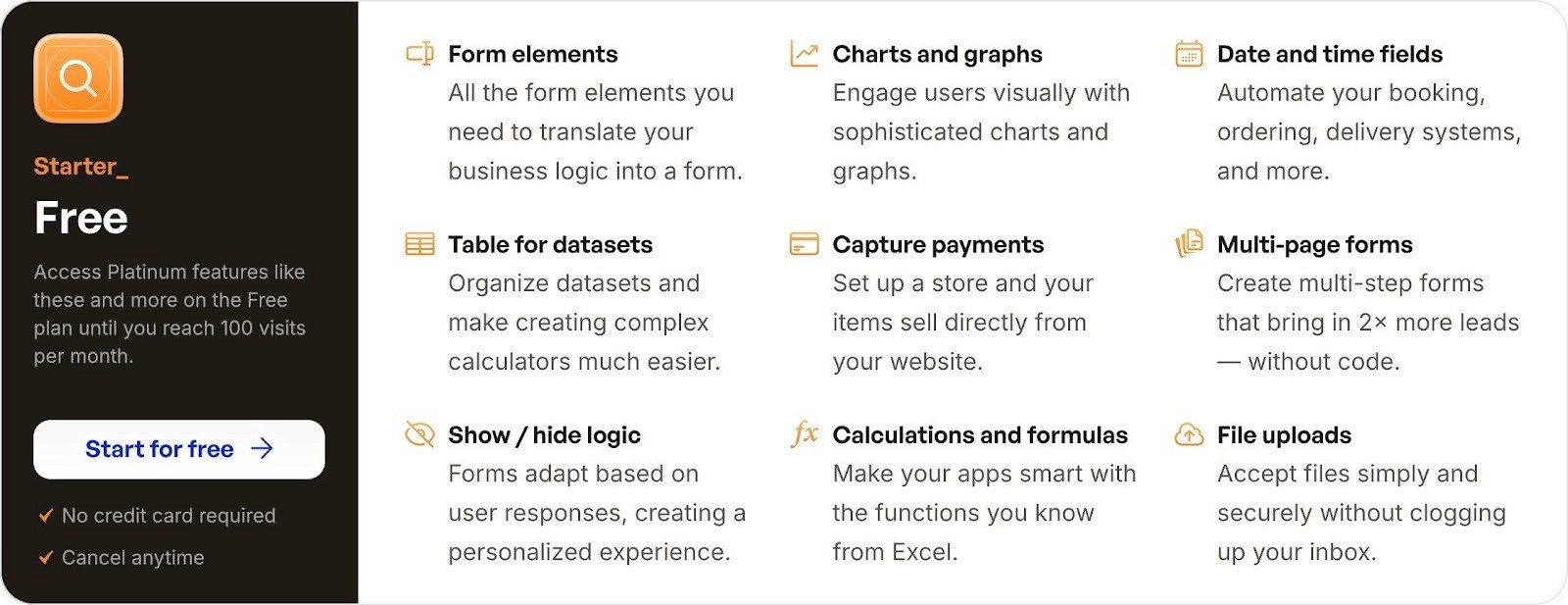
Yes, Convert_ offers a free plan. With our free forever plan,you can try all of the premium features until your tool gets 100 visits per month.
While some platforms offer a 14-day trial (or less), we know that 14 days isn’t always enough time to test software. So, we offer the free forever plan, giving you access to all of the platinum features.
This gives you the time to decide which features are right for you and your needs. Then, you can upgrade your plan as you scale.
Now, when you sign up, get inevitably sidetracked with other tasks, and forget about testing the software for a while, you can jump back into our free forever plan.
Try and test every premium feature until your calculator gets 100 visits per month.
Outgrow doesn’t offer a free plan for calculators. They offer a very limited free version for forms/surveys only.
Outgrow does offer a 7-day free trial where you can access their highest-tier business plan. Once the trial expires, you must choose a plan and add your credit card to continue using the product.
Yes, Convert_ can handle powerful calculations.
At Convert_, we developed a unique calculation engine called FormulaScript. This dynamic feature is what makes our platform the most powerful no-code calculator builder on the market.
You need high calculation efficiency to handle creating complex and powerful calculators, which some no-code builders don’t have. A lack of efficiency causes a dramatic drop in calculation speed in larger, more complex calculators (which tanks user experience).
FormulaScript makes our calculators 100x more efficient and gives us more freedom to adjust and add new formulas. But what does that mean for you and the end user?
SPEED!
Calculator builders that don’t have this calculation efficiency become slow. The more calculations you ask of them, the slower they get.
Convert_ has eliminated this problem, allowing you to create the most complex calculator you can imagine, using Excel-like formulas and conditional logic.
Outgrow can’t handle powerful calculations in the same way Convert_ can. The platform uses Excel-like formulas and conditional logic to perform calculations, just like Convert_.
But there’s one huge difference between the two platforms: Convert_ uses its unique calculation engine, FormulaScript.
Outgrow doesn’t have the calculation efficiency of Convert_. This means Outgrow can’t deal with larger, more complex calculators in the same way.
If you need to perform complex calculations at speed, you need Convert_.
Both platforms are no-code builders with drag-and-drop functions. This makes it easy to create calculators, without learning code or hiring developers.
Adding elements like titles, text, and images is easy. The drag-and-drop function lets you arrange the elements however you like in just a few clicks.
The formulas in both platforms may be a sticking point for some users. These can take a little getting used to if you aren’t already familiar with Excel formulas.
But once you have the formulas down, creating calculators is a breeze. And each platform has templates to choose from if you’re stuck.
Simply customize an existing Convert_ template to meet your needs and embed it into your website.
Yes, Convert_ has product configuration capabilities. If you need a product configurator with real-time pricing adjustments, Convert_ is the only solution between the two.
Our layered images feature lets users see the changes they make when configurating your products. The images update to display how each option looks when they make different selections.
After each selection, users get instant pricing updates because we handle dynamic pricing. Your customers instantly see how the product looks and get the final price within the product configurator.
Real-time pricing updates – Prices adjust instantly based on user selections.
Handles complex configurations – Supports multi-step forms, layered images, and conditional logic.
Can display visual product changes with layered images – Users can see how different selections impact their final product.
Ideal for businesses selling customized products & services – Used in industries like manufacturing, construction, home improvement, and custom eCommerce.
Supports tiered & conditional pricing – Users can apply rules (e.g., volume discounts, material surcharges).
Home Renovation & Construction Estimator
No, Outgrow doesn’t have product configuration capabilities. You can create calculators, forms, quizzes, assessments, and other types of interactive content. But you can’t build a product configurator with Outgrow.
If you need to build a product configurator, you need Convert_.
You have the option to customize calculators with Convert_ and Outgrow. They let you customize:
Branding
Headings
Questions
Results pages
Email notifications
Text fonts and images
There are some differences to customization based on the plan. For instance, comparing the lowest-tier plans:
Outgrow: Standard access to custom branding, meaning you can add your logo and change your theme colors but can’t remove Outgrow branding.
Convert_: Embedded website calculators don’t have Convert_ branding, although standalone pages do have a branding badge.
Both platforms also offer higher levels of customization. Convert_ gives you full control of custom styling with CSS, while Outgrow lets you use custom HTML pages.
While both options require knowledge of CSS and HTML respectively, they give you more control over customization for your calculators.
In the demo below, we show how you can use custom CSS. In the first example, we show how we can style a multiple choice component with multiple lines of CSS. In the second example, we add a light purple outline on our text inputs with CSS.
When integrating with other software, both platforms have similar capabilities. Outgrow has slightly more native integrations, which can make some a little more convenient.
But both integrate with 1000+ apps through Zapier and with whatever tool or service you’re using through WebHooks.
Convert_ lets you integrate with more analytics tools than Outgrow (Facebook Pixels and Google Analytics). With Convert_, you can track events with:
Google Analytics
Google Tag Manager
Amplitude
Mixpanel
Facebook Pixel
This gives you a wider scope for gathering and tracking data related to calculator usage.
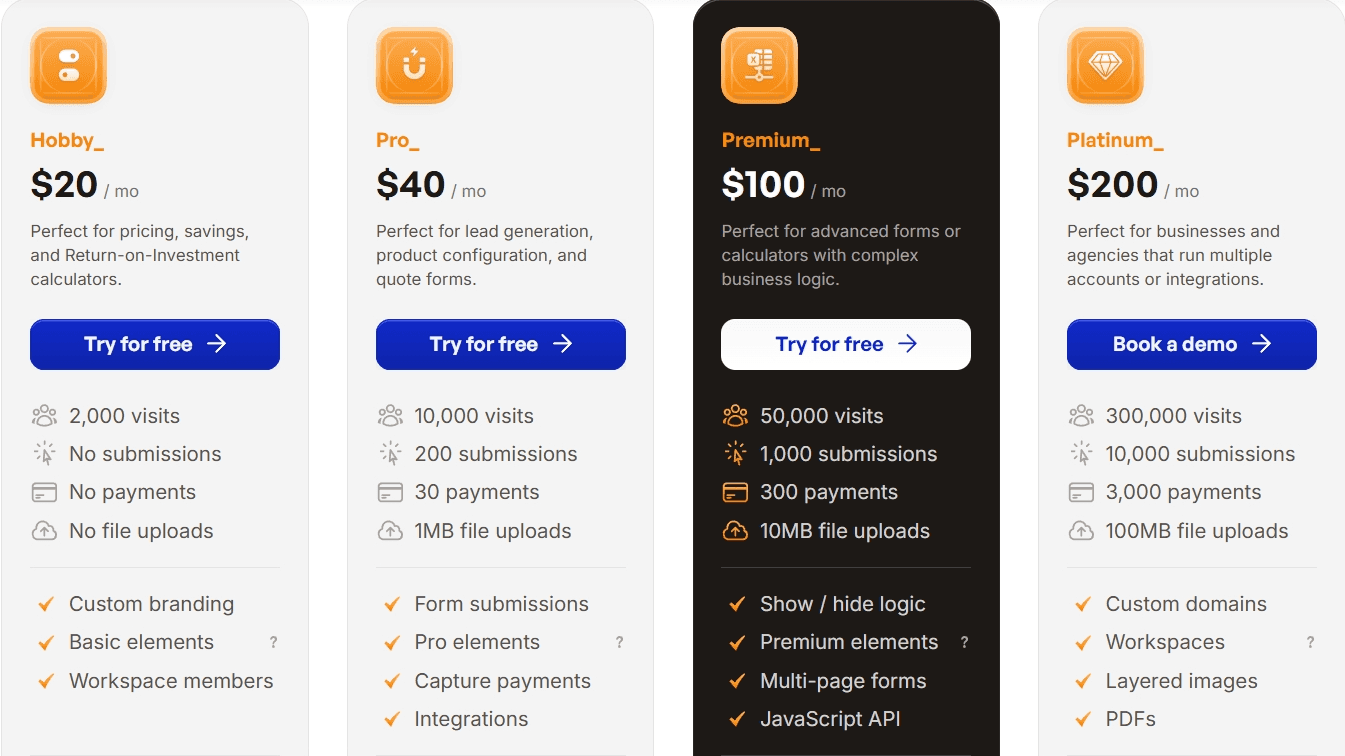
The pricing looks quite similar between Convert_ and Outgrow, except for the highest-tier plans (Outgrow is much dearer). But if you check what’s included, Convert_ delivers better value across the board.
For instance, let’s look at the highest-tier Convert_ Platinum Plan ($200/month) and the Outgrow Essentials Plan ($115/month), which is their second-highest tier and the nearest in price to our Platinum Plan.
The Convert_ Platinum Plan gives you access to every feature and:
Includes 10,000 submissions per month
Includes 3 workspaces
Tools you create don’t have Convert_ branding
Outgrow’s Essentials Plan is more limited, as it only includes standard and default layouts, standard access to analytics, standard access to advanced features, offers 7,500 submissions per month, 3 users, and you can’t remove Outgrow branding from tools.
With Outgrow, you need the Business Plan to access all features - which is $720/month (almost 3x more expensive than Convert_).
For both platforms, ratings show that customers are happy with the products. Convert_ scores 4.8/5 on Capterra, with Outgrow getting the same rating.
Convert_ is the best no-code calculator builder when compared to Outgrow.
Convert_ has a free plan, while Outgrow only offers a 14-day free trial.
Convert_ is best for creating powerful, complex calculators with large datasets.
Convert_ is the only option if you need product configuration capabilities.
Convert_ has a lower barrier to entry for pricing and cheaper high-tier plans.
For marketers, Outgrow is a decent platform for creating standard calculators. But Convert_ blows it out of the water when it comes to creating larger, more complex calculators.
Convert_ can do everything Outgrow can do… and more.
FormulaScript is the differentiator, giving Convert_ the power under the hood to handle more complex calculations - without slowing down to a snail’s pace.
Convert_ is a powerful no-code tool that helps you build and customize interactive calculators. You can create calculators to:
Spread brand awareness
Increase engagement
Build an audience
Generate leads
Boost sales
Convert_ makes creating interactive calculators straightforward and offers other advantages:
Most powerful calculations
Embeds into any website
Excellent integrations
Highly customizable
Easy to use
Free plan
Our software does all the heavy lifting for you. Benefit from a user-friendly, drag-and-drop builder for creating powerful interactive calculators - without coding skills.
Getting started is easy.Sign up for a free forever plan, choose atemplate, and customize it to suit your needs.
Frequently asked questions answered








