















What you'll learn
- What Is a Shopify Product Configurator?
- Why Shopify's Built-In Options Fall Short
- The Three Types of Shopify Configurators
- Type
- Best for
A Shopify product configurator lets customers build custom versions of your products, see real-time pricing, and buy without ever talking to your team. It automates price quoting for made-to-order items that Shopify's standard variants can't handle.
Your Shopify store handles standard products fine. But custom orders are where things break down. If you quote them manually, you lose deals to faster competitors. If you limit customization because the process is too complex, you leave money on the table.
This guide is for Shopify merchants selling configurable or made-to-order products who want to automate quoting. Here's how to choose a configurator that fits your business.
Key Takeaways
-
A configurator lets customers pick product options, watch the price update live, and buy customizable products without manual quoting.
-
Shopify's built-in variant options cap at 100 combinations per product and can't run custom pricing rules, so complex builds need a configurator.
-
There are three types: basic apps, 3D/AR visual tools, and advanced logic platforms like Convert_.
-
Match the tool to your pricing complexity, not the flashiest demo.
-
For custom pricing, quoting workflows, and in-house control, an advanced configurator beats a basic Shopify app.
What Is a Shopify Product Configurator?
A custom product configurator is a tool that lets shoppers build their own version of your products directly on your store. They pick options (size, color, materials, add-ons), see the price update instantly, and add their build to cart.
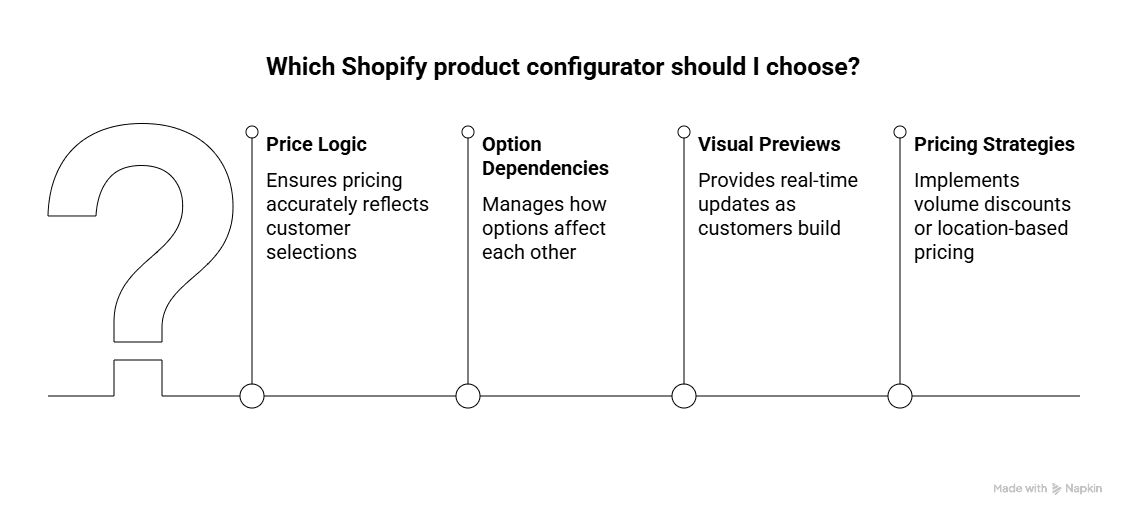
This goes way beyond Shopify's built-in product variants. Variants work for simple choices: small/medium/large, red/blue/green. A configurator handles complex scenarios where:
-
Price depends on multiple selections
-
Some options affect what other options are available
-
You need a live preview that updates as customers build
-
Volume discounts or location-based pricing apply
Why Shopify's Built-In Options Fall Short
Shopify's variant system maxes out at 100 variants per product (3 option types with up to 100 combinations). That's fine for basic stores.
But if you're selling:
-
Custom furniture with dozens of material/finish/size combinations
-
Configurable equipment with compatibility rules
-
Personalized e-commerce products with dynamic pricing
-
B2B sales orders with volume breaks and approval workflows
...you'll hit Shopify's limits fast.
Even with metafields or Shopify Functions, the variant options stay rigid. Shopify can't handle conditional logic ("if customer picks A, hide option B and change the price formula") without apps or custom code.
The Three Types of Shopify Configurators
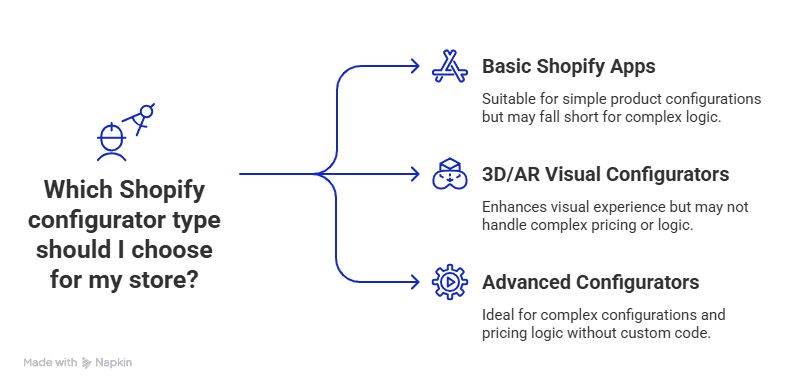
Not all product configurators on Shopify are built the same. Some are simple plug-and-play apps that let customers tweak a T-shirt. Others focus on 3D visuals to wow buyers. Then there are advanced platforms that handle complex pricing, quoting, and logic rules for serious B2B or high-consideration products.
Here's how the three compare at a glance:
Type | Best for | Where it stops |
|---|---|---|
Basic Shopify apps | Simple personalization: text, color, bundles | No complex pricing, no custom logic, no quoting |
3D/AR visual configurators | High-ticket items that need 3D models or augmented reality | Costly 3D assets; visuals over logic |
Advanced configurators (e.g. Convert_) | Complex pricing, B2B quoting, in-house control | Less focus on photorealistic 3D |
Choosing the right type depends less on what looks flashy and more on what your business needs: quick personalization, immersive visualization, or deep quoting workflows.
1. Basic Shopify Apps (Limited Power)
Apps like Custom Product Builder or basic Kickflip installations add simple customization to product pages. Good for straightforward scenarios: pick a few product options, add to cart, done. You'll find dozens of them on the Shopify App Store.
Works for:
-
Basic T-shirt customization (text, graphics, colors)
-
Simple product bundles
-
Basic engraving or personalization
Breaks down when:
-
Pricing logic gets complex
-
Options need to show or hide based on previous selections
-
You need quoting workflows, not just "add to cart"
2. 3D/AR Visual Configurators
Tools like Zakeke or premium Kickflip plans focus on visual wow-factor: 3D models, augmented reality, photorealistic previews. A 3D product configurator renders models customers can rotate, plus a live preview that updates as options change.
Worth it if:
-
You're selling high-ticket items where visualization matters (watches, vehicles)
-
Your customers need to see spatial fit (AR for "see it in my room")
-
You have budget for 3D asset creation and maintenance
Not worth it if:
-
Your products work fine with 2D layered images
-
The extra cost doesn't justify the conversion lift
-
You're looking for a workflow, not just a configurator
3. Advanced Configurators
Platforms like Convert_ give you the logic power of enterprise CPQ without the enterprise price tag or complexity.
Built for:
-
Complex pricing rules and conditional logic
-
B2B quoting workflows (generate PDFs, send to CRM, track approvals)
-
Products where functionality matters more than 3D visuals
-
Businesses that need in-house control (update pricing and rules yourself, no dev tickets)
Here's an editable Pool Product Configurator by Convert_.
Home Renovation & Construction Estimator
What Matters in a Shopify Configurator
Here's what determines whether a configurator will work for your business.
1. Can It Handle Your Pricing Logic?
If your pricing involves more than "base price + option upcharges," most Shopify apps will fail you.
Businesses need:
-
Volume discounts that vary by product type
-
Location-based pricing (shipping zones, regional fees)
-
Bundled pricing where selecting multiple items triggers different rates
-
Material cost updates that propagate automatically
Convert_ handles this with FormulaScript: you build your pricing logic once, and it calculates correctly every time. It can even generate a bill of materials for production from the same configuration.
2. Does It Lock You Into Their Structure?
Most Shopify configurator apps work great until your business changes. New product line? Different pricing model? Seasonal promotion with custom rules?
If you're filing support tickets or waiting on the app developer to add features, you don't really own your configurator.
Convert_ lets you update everything yourself: product options, prices, and rules from one place, not buried in the Shopify admin. No code, no waiting, no "sorry, that's not possible with our app."
3. Will It Scale With Your Catalog?
Start with five products, end up with fifty. Simple pricing becomes complex as you add options, bundles, and custom rules. As your catalog and inventory management get heavier, a rigid app starts to crack.
Cheap apps work until you outgrow them. Then you're rebuilding from scratch.
4. What About Visual Configuration?
If customers need to see their build, you need visual previews.
2D layered images work for most businesses:
-
Stack component images (base + color + accessories)
-
Fast loading, easy to update
-
A live preview that updates with every selection
-
Examples: pools, furniture, modular products
3D only makes sense if:
-
You're selling high-ticket items where rotation and zoom matter
-
You have budget for 3D asset creation
-
The conversion lift justifies the cost
Convert_ supports 2D visuals without the complexity or cost of full 3D.
This tiny house product configurator lets customers choose and visualize their build as part of a quote request. The business gets qualified leads with the chosen configuration attached.
5. How Does It Integrate With Your Workflow?
Your configurator doesn't exist in isolation. It needs to connect to:
-
Shopify checkout (obviously)
-
Your CRM (HubSpot is the #1 request)
-
PDF generation for quotes
-
Google Sheets for product data, inventory management, or order tracking
-
A file upload field so customers can attach artwork or specs
-
Payment processors beyond Shopify Payments
Convert_ for Shopify: Beyond Basic Apps
Standard Shopify apps work great until your products get complicated. Multi-step configurations. Conditional pricing. Logic that depends on customer choices three steps back. That's when everything breaks down, and you're stuck with spreadsheets or custom code that costs a fortune to maintain.
Convert_ was built specifically for this moment, when you need more power than an app but don't want to hire developers.
Complex Logic, No Code Required
FormulaScript gives you high-level calculation power with a visual interface. Build pricing rules and multi-step workflows without writing code.
Stefan Knight from JSJ Smart Homes: "The fact that ConvertCalculator has the power of Excel with their already-powerful user interface and conditional logic was just an absolute game-changer for us."
Embed Anywhere on Shopify
Drop the configurator on e-commerce product pages, create standalone configuration pages, or use it as an internal quoting tool for your sales team.
Real-Time Pricing and Visuals
Customers see accurate pricing as they build. Visuals update instantly to show their selections if you're using visual configuration, which keeps the customer experience smooth from first click to checkout.
Proof It Works at Scale
-
100% booking increase
-
40+ hours per week saved
-
Full quote-to-payment automation in five minutes
-
50%+ year-over-year growth
-
Quote time: days to two minutes
-
Zero quoting errors after implementation
-
95-97% reduction in manual quoting work
-
Complex custom home configurations automated
Common Shopify Configurator Use Cases
Complex products shouldn't mean complex headaches. Whether you're selling custom furniture, modular equipment, or personalized luxury goods, your customers want to configure exactly what they need and see accurate pricing instantly.
Here's how you can set up Convert_ to handle the scenarios where standard Shopify tools fall short.
Custom Furniture and Home Goods
Customers pick frame style, fabric, finish, and dimensions. Visual previews show their selections. Dynamic pricing accounts for material costs and customization level.
This customizable chair configurator template can be configured for any furniture for custom quoting.
Personalized Apparel
Beyond basic print on demand. Think custom fit options, material upgrades, and design elements with pricing that changes based on complexity.
Screen printing price quote calculator
Custom Gift and Luxury Items
High-touch products where personalization drives value. The configurator handles engraving, material upgrades, and packaging options with clear pricing at every step.
Custom Jewelry
Rings, necklaces, and bracelets with selectable metals, stones, engravings, and sizes. Configurators let customers personalize each piece and see live price updates before checkout.
Eyewear and Sunglasses
Frame shape, color, and lens options displayed interactively. Customers can add prescriptions, coatings, and engraving in one flow before checkout.
How to Choose the Right Configurator for Your Shopify Store
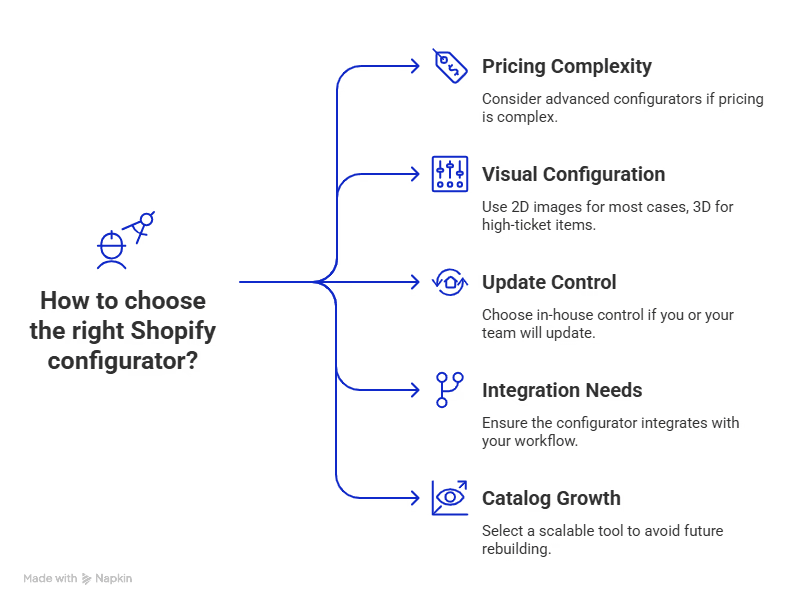
Start with these questions:
-
How complex is your pricing? If it's more than "base price + simple option fees," basic apps won't cut it.
-
Do you need visual configuration? If yes, 2D visuals work for most cases. Only invest in 3D if you're selling high-ticket items where it matters.
-
Who needs to update the configurator? If the answer is "me" or "my ops team" (not "our developer"), you need in-house control.
-
What integrations matter? HubSpot for leads? PDF for quotes? Make sure your configurator connects to your workflow.
-
Will your catalog grow? Choose a tool that scales. Rebuilding six months from now because you outgrew your app is expensive.
When Convert_ is the right move:
-
Your pricing involves multiple variables or complex logic
-
You've hit the limits of Shopify variants or basic apps
-
You want in-house control (no developer dependency)
-
You need quoting workflows, not just "add to cart"
-
You're in B2B or high-touch sales where configuration matters
Stop Losing Deals to Manual Quoting
Shopify handles standard products perfectly. But custom products? That's where most stores break down.
Basic Shopify apps work for simple scenarios. When your business outgrows them, and if you're scaling, you will need more power.
Convert_ gives you that power without the enterprise complexity or developer dependency. You control your pricing logic. You update when your business changes. You own the process.
Ready to automate custom product sales?
Book a demo to see how Convert_ handles your specific products.
Chair Product Configurator
FAQ
Frequently asked questions answered








Use cases
