




What is a sales funnel? A practical guide for service businesses






Pira Seligman
Pira Seligman

A sales funnel describes how potential customers move from discovering your business to deciding whether to buy. It helps you see which decisions they can make and where they need more information.
For a service business, that journey might include finding your website, checking whether you serve their location, exploring a price, sending a request, and agreeing to the work.
Some people leave at each point. Some return later. The funnel is a way to understand that movement, not a rule that every buyer follows the same sequence.
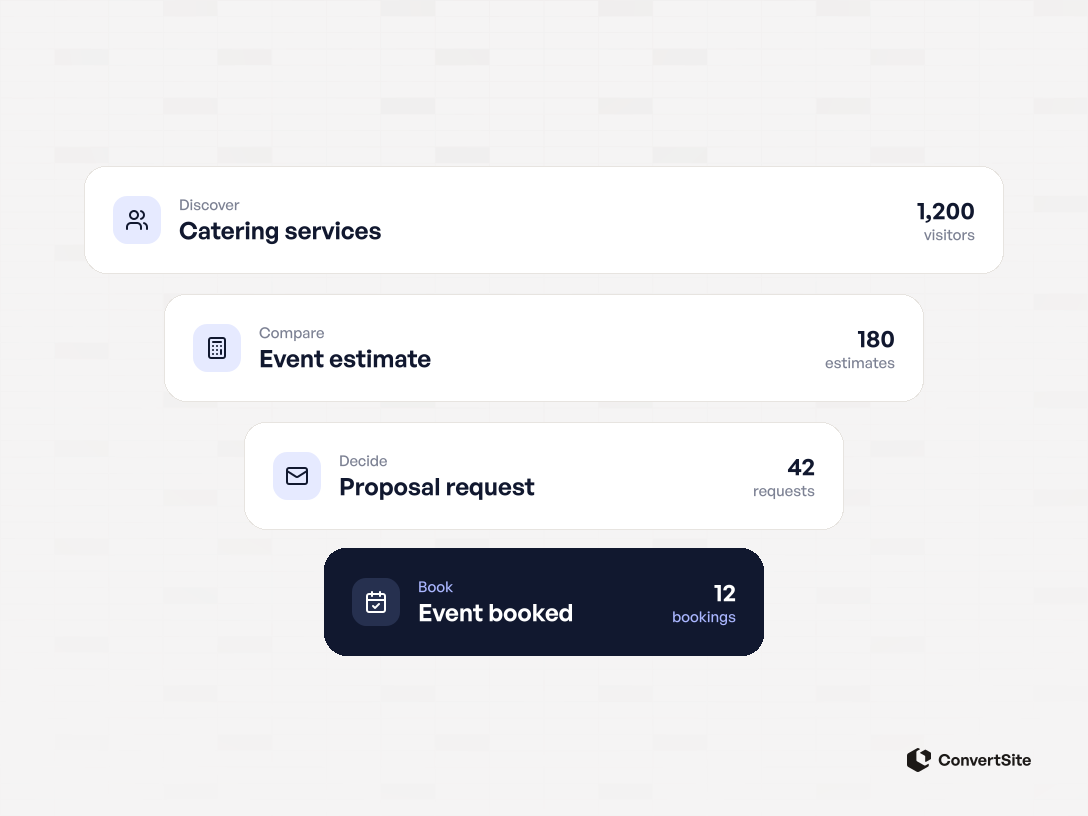
Suppose an event organiser lands on a catering website. They need to know whether the business can handle the event, what the service includes, and whether it fits the budget.
If the page only asks them to get in touch, those decisions move into an email conversation. The visitor may contact you, continue researching, or leave with the questions unanswered.
A funnel map helps you identify what should happen before the request and what still needs a person. It connects marketing activity to the actual buying process.
Start with the path a customer can take today. A useful map might fit on one page. You can add detail when you know what decision that detail supports.
Stage names vary. For this service-business example, use awareness, consideration, and decision. Those labels describe what the buyer is trying to resolve.
The organiser realises they need catering and finds a business through search, a recommendation, or a campaign.
At this stage, help them recognise that the service could fit. Explain the event types, locations, and work you cover. A relevant example gives them something concrete to assess.
The useful next step is to explore the offer. A request for a detailed sales call may be premature for someone who does not yet know whether you serve their event.
The organiser compares service options and tries to understand the budget. They may need to consider guest count, service style, timing, and venue requirements.
Your page can explain those choices. Where your pricing rules support it, a calculator can show how the selections affect an estimate.
The purpose is to help the visitor make a relevant decision. Completing questions only matters if the result gives them something useful to work with.
The organiser is ready to discuss the event or request a proposal. Your team needs the selected options, date, and any conditions that require review.
Confirm availability and scope before treating the job as booked. Explain what the customer must do to accept the offer and what your business will do next.
A submitted form is a request. A completed sale needs its own clear definition, such as an accepted proposal and the required booking payment.
Here is an illustrative catering journey. It is a suggested structure, not a customer case study.
| Buyer action | Question being resolved | What the business should provide |
|---|---|---|
| Finds the service page | Can this company handle my kind of event? | Relevant service, location, and scope information |
| Explores the options | What would suit our guest count and format? | Choices with explanations of what changes |
| Views an estimate | Does this fit our budget? | A range or price with assumptions and exclusions |
| Sends a proposal request | Can we discuss this event? | A confirmation carrying the selected details forward |
| Reviews the proposal | Can we agree to this scope and date? | Confirmed availability, terms, and acceptance steps |
The Event & Catering Quote Calculator is one starting point for the website portion. Replace its sample offer and pricing rules with your own.
If the buyer needs a conversation before pricing makes sense, use a structured request instead. The right flow depends on what you can reliably answer online.
A sales funnel helps you understand how buyers progress and how many reach each step. A sales pipeline helps the team manage particular opportunities and the next action on each one.
Salesforce describes the distinction through the buyer's journey and the seller's view of active deals.
In the catering example, the funnel shows the movement from service-page visits to requests and customers. The pipeline shows that one event needs an availability check, another has a proposal awaiting review, and another is booked.
Use both views when they help. You can count plenty of requests while individual opportunities sit unanswered. You can also manage every request carefully while attracting too few suitable visitors.
For the website, record sessions reaching the page, starting an interaction, reaching a result, and sending a valid request. Define each action clearly.
After the request, track whether the lead meets your criteria, receives a proposal, and becomes a customer. A person can return to the website several times, so visits and people are different counts.
For a stage-to-stage rate, divide the number progressing by the number eligible to progress, then multiply by 100. Keep both counts from the same group.
For example, if 12 of 30 valid requests eventually become customers, the request-to-customer rate is 40%. Those are hypothetical figures. The calculation assumes one deduplicated record per opportunity and enough time to observe the outcomes.
Do not divide this month's completed jobs by this month's new requests if many of those jobs started earlier. Follow request cohorts, and give them a consistent period to progress.
The landing-page conversion guide explains the website measurement in more detail.
When few relevant people reach the page, investigate discovery and the message that attracts them. When visitors arrive but cannot judge the offer, check the information and choices the page provides.
When requests are unsuitable, define what makes them unsuitable. Service coverage, scope, and budget may need explaining earlier. When suitable requests stop progressing, review the reply and the proposal process.
Read the actual messages before changing the whole website. A repeated question about what a price includes gives you a specific place to start.
With ConvertSite's sales-funnel builder, you can connect questions to a price, recommendation, or next step. The wider funnel still includes how people discover you and what your team does after a request.
Start from a relevant template, use the built-in AI assistant, or build with Codex or Claude connected to ConvertSite. Whichever starting point you choose, define the rules your business can support and test the complete request.
Keep the flow manageable when your offer changes. Update the affected price or service rule, then check the answer the visitor sees and the details your team receives.
Map one service first. Make the next decision clear at each step, follow what happens to the requests, and use that evidence to decide what needs work.
Frequently asked questions answered