










What you'll learn
- Choose lead sources that match your photography services
- Attract local enquiries with useful pages and accurate business information
- Use the Photography Session Planner to connect scope, estimates, and enquiries
- Define lead qualification and keep availability confirmation clear
- Follow up and measure bookings against acquisition costs
Photography leads are people who enquire about hiring you for a shoot. They may find you through local search, referrals, social media, a venue recommendation, or a paid campaign. Your website then needs to help them understand your work, judge whether the service fits, and send a useful enquiry.
This guide explains how to attract local photography leads, what to ask before preparing a quote, and how to follow up. It includes a Photography Session Planner example showing how a visitor can explore their scope and estimated budget before getting in touch.
ConvertCalculator is now ConvertSite. Older resources may still use the ConvertCalculator name. ConvertSite builds interactive landing pages and sites that ask questions, apply your business rules, and give visitors a useful answer before they enquire.
Key takeaways
- Build a route from each lead source to a relevant portfolio or service page, then offer a clear next step.
- Ask questions that help both sides assess the job: service, location, timing, coverage, and deliverables. Apply explicit fit criteria when qualification is part of your process.
- Show an estimate with its assumptions when the final scope needs discussion. Confirm availability separately from collecting a requested date.
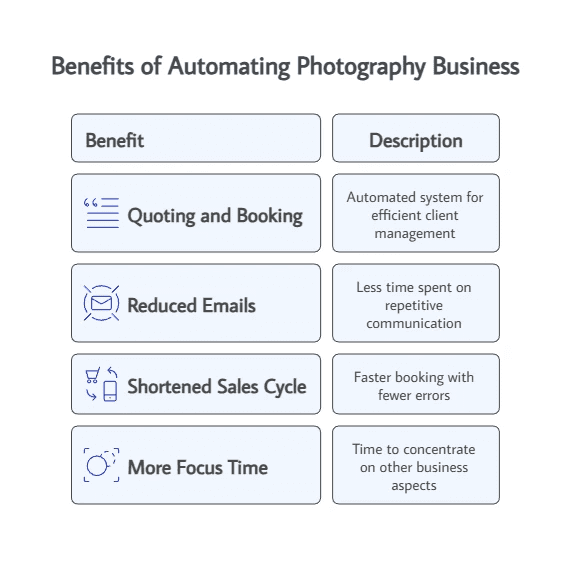
- Use a session planner to help visitors prepare their enquiry. Configure and test any email, CRM, booking, or payment step you add.
- Measure enquiries, fit, bookings, and acquisition costs by source. More form submissions alone do not establish that a channel is working.
What are photography leads?
A photography lead is a person or business who has expressed interest in your services, for example by requesting a quote or asking about a session. A portfolio visit or social-media like can show interest, but it gives you less information than a direct enquiry.
A qualified photography lead meets criteria you have defined. That might include a service you provide, a location you cover, a workable budget, and a date your team can accommodate. Collecting these answers helps you assess fit; a completed form does not automatically confirm every condition.
Ask for details relevant to the shoot. A wedding enquiry may need coverage hours and venue information. A portrait enquiry may need group size and location preferences. Brand photography may need a shot list, deliverables, and intended image usage.
Should you buy photography leads?
Buying photography leads can be useful when the source reaches suitable clients and the bookings justify the cost. Before paying, check whether enquiries are exclusive or shared, how location and service fit are established, and what counts as a valid lead.
Compare the full cost of a channel with the work it produces. Include the fees, advertising spend, and time spent responding. Track whether enquiries become booked jobs and whether those jobs leave an acceptable margin after delivery costs.
Your own website can also receive enquiries from organic search, referrals, and campaigns. Owning the enquiry process gives you control over the questions and next step. It still takes work to attract visitors and maintain the experience.
If you already buy leads, use a small, measurable trial when comparing another source. Avoid assuming that either bought or self-generated enquiries will always be the better fit.
How do you generate your own photography leads?
Choose channels that match the work you want to book, then connect each one to a relevant page on your site.
| Lead source | Practical action | Useful destination |
|---|---|---|
| Local search | Keep your business information accurate and publish work relevant to the services and areas you cover | A service page with local work, clear coverage, and an enquiry option |
| Referrals | Give past clients a specific link they can share with someone planning a similar shoot | A portfolio or service page for that type of session |
| Venue and supplier partnerships | Share relevant galleries and agree how interested clients can find out more | A page explaining your approach and experience with that work |
| Social media | Show completed projects and explain the brief, choices, and deliverables | The matching project or service page |
| Paid campaigns | Test a defined service, audience, and offer with a controlled budget | A landing page that matches the campaign and records its source |
Give visitors enough context to decide whether to enquire. Show work you can discuss, describe what is included, and explain what affects the price. A session planner or interactive quoting calculator can help when the useful answer depends on the customer's requirements.
For wedding-specific channels and examples, see the separate guide to wedding photography leads.
How do you set up a photography lead generation website?
Build the page around the questions a potential client needs answered before contacting you.
- Make the service clear. State what you photograph, where you work, and the kind of client or project you serve.
- Show relevant proof. Use your own portfolio, accurate project stories, and approved client feedback. Explain the brief and deliverables behind the images.
- Explain the buying decisions. Describe packages or scope choices, what affects the estimate, and what needs a conversation.
- Offer a useful next step. Let the visitor plan a session, explore an estimate, or request a consultation through a lead capture flow.
- Collect the details you will use. Ask questions that prepare the next conversation, then configure the destination for the enquiry.
- Test the whole journey. Check the questions, estimate, mobile layout, and received request. Test any acknowledgement or connection separately.
An interactive landing page can support one service or campaign. A full site can connect several services and portfolio pages to the relevant enquiry journeys.
Example: turn portfolio interest into a photography enquiry
The Photography Session Planner is a practical example for photographers offering wedding, portrait, or brand work. It helps a visitor assemble a proposed scope and see a starting estimate before submitting an enquiry.
Follow a portrait enquiry through the planner
Imagine a client looking for portraits of a small family. They like the work on your site but need to understand what kind of session to request.
- Choose portrait photography. The planner follows questions relevant to that service rather than asking the client to complete a wedding brief.
- Describe the session. The client provides details such as the people involved and the preferred setting. These help shape the proposed scope.
- Review the estimate. The result explains the sample coverage and deliverables, alongside a price range and relevant allowances.
- Prepare the conversation. A copyable consultation brief brings the proposed scope, creative direction, timing, location, and preparation notes together.
- Send an enquiry. The client can share their name and email with an optional message after seeing the estimate.
The photographer can then discuss the scope and confirm the date and final fee. A requested date is not an availability check or a confirmed booking.
The template uses a fictional studio, example imagery, and sample EUR pricing. Replace those with your own work, terms, and rates. Its listing states that automatic email is not configured, so set up any acknowledgement you want and test where enquiries are received.
The wedding and brand routes ask different questions. Use the routes that match your services and remove choices you cannot fulfil.
Adapt the flow with AI
You can use ConvertSite's AI assistant or connect Claude or Codex to help adapt the page and its rules. Give the assistant your services, pricing assumptions, deliverables, and the details needed for a consultation.
For example:
Adapt the Photography Session Planner for my portrait photography business. Keep a route for family sessions and ask about group size, setting, and preferred timing. Use the rates and deliverables I provide to show an estimated range with clear inclusions. Let visitors review their consultation brief before enquiring. Keep availability subject to my confirmation. Ask me where enquiries should go, then let me review the calculations and delivery setup before publishing.
Check the generated copy and calculations against your actual offer. Keep the questions relevant and make the final enquiry include the scope your team needs to review.
How do you attract local photography leads?
Help nearby clients understand which services you offer and where you provide them.
Maintain your Google Business Profile. If your business is eligible, verify the profile and keep its category, service information, contact details, and hours accurate. Add representative work and respond to client reviews. Google's local ranking guidance explains how relevance, distance, and prominence affect visibility.
Publish useful local work. Show projects, venues, and settings you know. Explain the session and the decisions behind it. If you create pages for different areas, give each one useful, specific information based on work and services you actually offer there.
State your service area and travel terms. Make it clear whether you work in a studio, travel to clients, or do both. Explain when travel affects the price.
Use location in the enquiry when it matters. A venue or location question can help you check service-area fit and prepare an estimate. Automatic address checks or travel calculations require the relevant rules and connections to be configured and tested.
What free lead generation strategies work for photographers?
Start with activities that do not require advertising or per-lead fees. They still take time, and the tools used to host your site or handle enquiries may have costs.
- Ask past clients for referrals. Give them a relevant service link they can pass on to someone planning a shoot.
- Build useful partnerships. Share suitable work with venues, planners, stylists, and other businesses whose clients may need your services.
- Improve existing pages. Add clear service information, relevant galleries, and an enquiry step to pages that already receive visitors.
- Use an eligible Google Business Profile. Keep the information accurate and encourage clients to share honest feedback.
- Publish work with context. Show the brief, approach, and outcome so social visitors can recognise a service they need.
ConvertSite lets you build and test an interactive experience for free. Live publishing starts a trial and requires a paid plan to continue. Check the current plans and publishing terms before treating a tool as part of a permanently free setup.
How do you follow up with photography leads to convert them into bookings?
Set a response window you can meet and make the next step clear. A useful reply refers to the client's session and answers the questions that still prevent a decision.
- Acknowledge the request. Explain that it has been received and when the client can expect a personal response. Configure an automated acknowledgement only if the delivery step is in place.
- Review the fit. Check the requested date, service area, scope, and any stated budget. Ask for missing details before confirming a quote.
- Propose the next step. Send the relevant package or quote, offer a consultation, or explain why the request needs a different approach.
- Follow up on open enquiries. Use a reminder schedule suited to your process and the client's needs. Stop reminders once the enquiry is resolved.
- Record the outcome. Note whether the request became a booking and why suitable enquiries did not proceed.
Submission emails, CRM routing, reminder sequences, calendar checks, and payments are separate parts of the workflow. Choose supported connections, check plan requirements, and test the steps you intend to use. An estimate calculator alone does not establish that those steps are active.
What's the ROI of a photography lead generation calculator?
Measure whether the calculator helps suitable visitors move towards a booking at an acceptable cost. Track the whole process, including the traffic source and the work needed to follow up.
- Enquiry rate: enquiries divided by relevant page visits.
- Fit rate: enquiries meeting your defined criteria divided by all enquiries.
- Lead-to-booking rate: bookings divided by enquiries from the same cohort after enough time for a decision.
- Acquisition cost per booking: attributable marketing and lead-handling costs divided by resulting bookings.
- Contribution after acquisition: booking revenue less shoot delivery costs and acquisition costs.
For example, if 20 enquiries produce two bookings, the lead-to-booking rate is 10%. If acquisition costs for those bookings total $300, acquisition cost per booking is $150. Those figures are an illustration, not a photography industry benchmark.
Include attributable website, tool, advertising, and lead-handling costs once when calculating acquisition costs. Keep the reporting period and attribution method consistent so you do not count the same booking twice. Use a photography pricing model that reflects your own delivery costs.
Advanced features for photography lead generation
Use features that answer a buying question or prepare a more useful request.
Pricing rules and conditional questions
Coverage, deliverables, image usage, travel, and selected extras can affect the estimate. Ask relevant questions for each service and state which choices change the price. Check minimum charges, exclusions, and boundary cases before publishing.
Service-area and availability checks
Collect the location and preferred date when you need them to assess fit. Add explicit service-area rules or a verified availability connection if your process requires automatic checks. Keep a manual review step for requests your setup cannot confirm.
Enquiry handoff
Configure the received enquiry to include the relevant session details and displayed estimate. Test the receiving address or connected system with sample requests. Show a confirmation message that accurately describes what happened and what comes next.
A customer example
The Rift Photography story describes a configured workflow combining photography questions, quoting, and booking-related follow-up. Use it to explore the process. Match the connections and review steps to your own business before promising the same behaviour.
Start building your photography enquiry flow
Choose one service and identify what a client needs to know before contacting you. Link the right portfolio work to that next step, then test the questions, estimate, and received request.
Start with the Photography Session Planner for a scope and consultation brief. For a different experience, explore the Photography Coverage Planner or the Wedding Photography Feedback Form for collecting feedback after a completed job.
Build and test in ConvertSite, then review the publishing plan and any required handoff before going live.
Photography Quote Calculator
FAQ
Frequently asked questions answered