
Set up your marketplace profile
The Marketplace section of Workspace Settings sets up the profile used to publish templates.
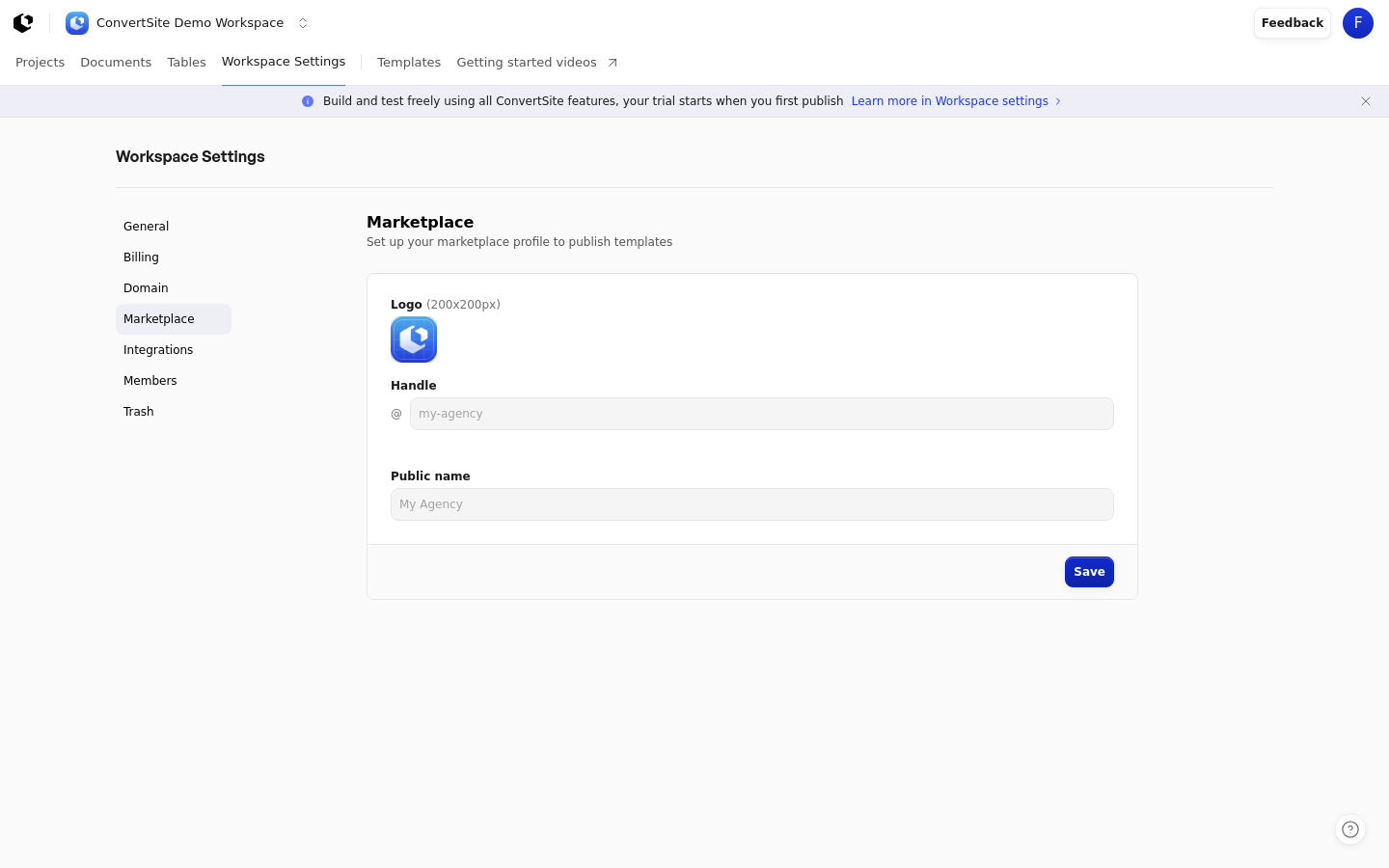
Open the Marketplace settings
You must be signed in, and the profile applies to the workspace you're currently in.
Open the main workspace navigation and choose Settings.
Select Marketplace from the left-hand menu. You're on the page titled "Marketplace", which describes setting up your marketplace profile to publish templates.
Fill in your profile
Enter each field, then save. The profile is made up of a logo, a handle, and a public name.
Logo (200x200px) — Upload a square image, 200 by 200 pixels.
Handle — Enter your handle, shown with an @ prefix. The placeholder is
my-agency. It must be 3 to 50 characters and can contain only lowercase letters, numbers, and hyphens.Public name — Enter the name shown on your profile. The placeholder is
My Agency. It can be up to 100 characters.Click Save.
Check your handle is available
As you type your handle, ConvertSite checks whether it's free. The check runs after you stop changing the input for 500 ms, then shows whether the handle is available or already taken.
If the handle is already taken, change it before saving.